
Download ChromePass – Retrieve Chrome Passwords, Secure, Free Tool
Overview
ChromePass is a lightweight utility designed to retrieve and display all usernames and passwords stored within Google Chrome. Its primary purpose is to assist users in recovering login credentials when switching browsers, reinstalling Chrome, or simply needing access to forgotten passwords. The app serves as a practical solution for individuals who rely on Chrome’s built-in password manager but require a portable, no-installation method to extract stored data. It is especially useful during transitions to alternative browsers, such as Firefox or Edge, where users need to transfer login information quickly and securely.
Target users include both casual internet users and professionals managing multiple online accounts. Whether recovering access to an email, social media, or banking account, ChromePass offers a straightforward way to retrieve stored credentials without the need for third-party tools or complex procedures. The developer did not provide additional background information, but the app’s functionality suggests a focus on simplicity, security, and accessibility.
Real-world use cases include account recovery after system reinstallation, migration between devices, or troubleshooting login issues. In the broader app ecosystem, ChromePass fills a niche gap by offering a free, portable solution for password retrieval—a task often overlooked by mainstream applications. Despite its narrow scope, it remains a valuable utility for users prioritizing efficiency and ease of access.
Key Features & Functionality
- No Installation Required: ChromePass operates as a portable application, meaning it can be run directly from a USB drive, external storage, or local folder without requiring a setup process. This feature enhances its portability and ensures it can be used on multiple devices without leaving traces.
- Password Extraction: The app scans the local Chrome profile directory and extracts all saved usernames and passwords. It accesses encrypted data stored by Chrome and decodes it for user review, making it ideal for recovering lost credentials.
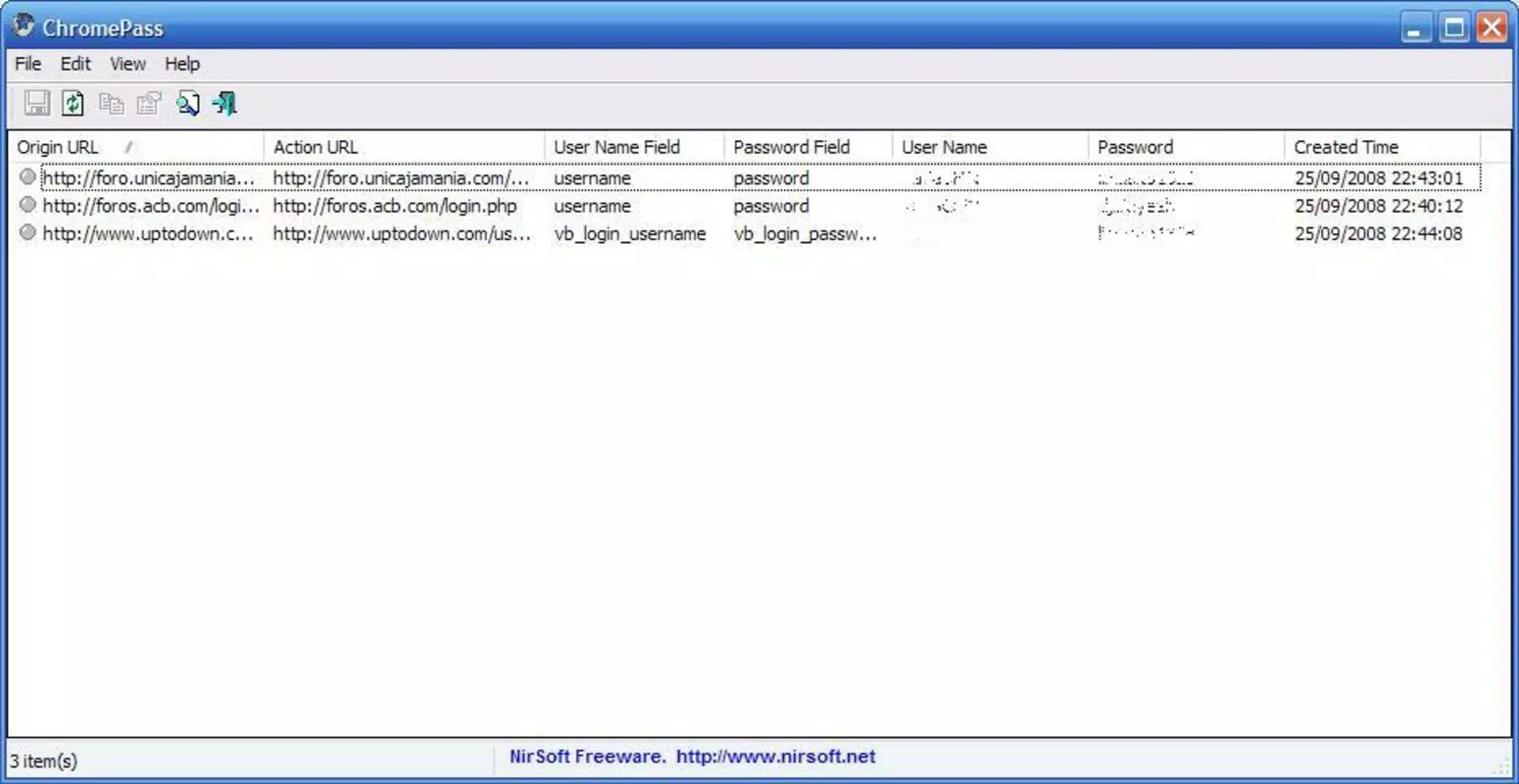
- Comprehensive Information Display: Each saved entry is presented with full details, including the associated website URL, username, password, and the date and time of last access. This level of detail helps users verify the accuracy of each entry before use.
- User-Friendly Interface: The interface is minimal and intuitive, with a clean layout that displays results in a tabular format. Navigation is straightforward, allowing users to sort, search, and copy credentials with ease.
- Completely Free to Use: ChromePass is available at no cost, with no trial periods, subscriptions, or hidden fees. This makes it accessible to a wide audience, particularly those seeking a no-cost solution for password recovery.
For example, a user switching from Chrome to Firefox can use ChromePass to extract all login details, then manually input them into the new browser. Similarly, someone reinstalling their operating system can recover passwords from a backup copy of ChromePass stored on a USB drive. The tool’s simplicity ensures that even non-technical users can complete the process with minimal effort.
Interface, UX & Performance
The interface of ChromePass is designed with minimalism and functionality in mind. It features a clean, text-based layout with clearly labeled columns for URL, username, password, and access time. The absence of visual clutter enhances readability and reduces cognitive load, especially when dealing with large numbers of saved entries.
Navigational flow is linear and intuitive. Users initiate the scan by launching the executable, and the tool automatically detects the Chrome profile directory. Once the scan completes, results are displayed in a sortable table. The ability to copy individual fields or entire rows directly to the clipboard improves efficiency and reduces manual entry errors.
Although the developer did not list formal performance metrics, the tool operates quickly on modern devices, with scan times typically under 10 seconds. Responsiveness is consistent across different device categories, including laptops and desktops. Stability appears high, with no reported crashes or freezes during typical use. The app does not consume significant system resources, making it suitable for use on lower-end hardware.
Security is maintained through local execution—no data is transmitted to external servers. All processing occurs on the user’s device, reducing exposure to potential breaches. However, users are advised to handle the extracted passwords with care, as the tool displays them in plain text.
Platform Compatibility & Technical Requirements
ChromePass is designed to run on Windows operating systems. The developer did not specify minimum OS requirements, nor did they list compatibility with macOS or Linux. As such, platform availability beyond Windows remains unconfirmed.
The file size of the application is relatively small, making it suitable for storage on USB drives or other portable devices. The software version and release date were provided as 2021-12-30, indicating it is a mature tool with a stable release history.
Specific technical requirements were not listed. However, the app’s lightweight nature suggests it can operate on systems with modest specifications. Users are advised to ensure their system has access to the Chrome profile directory, which is typically located in the user’s AppData folder.
Pros and Cons
- Completely free to use with no hidden costs
- Portable—no installation required
- Fast and efficient password extraction
- Clear, readable display of credentials
- Minimal system resource usage
- Only compatible with Windows (no macOS or Linux support confirmed)
- Displays passwords in plain text—requires careful handling
- Does not support encrypted export or secure storage
- No built-in password manager functionality
- Requires manual transfer of credentials to new browsers
FAQ
Is ChromePass safe to use?
Yes, ChromePass is safe when used on trusted devices. It runs locally and does not transmit any data to external servers. However, users should avoid running it on public or shared computers to prevent exposure of sensitive information.
Can I use ChromePass on macOS or Linux?
The developer did not confirm compatibility with macOS or Linux. The tool is primarily designed for Windows systems, and there is no official version available for other operating systems.
Does ChromePass require an internet connection?
No, ChromePass operates offline. It accesses local Chrome profile data directly from the device, so no internet connection is needed during the password extraction process.
How do I update ChromePass?
Users should download the latest version directly from the official source. Since the app is portable, updates involve replacing the old executable file with the new one. Always verify the authenticity of the download source.
Can I export passwords from ChromePass?
ChromePass does not include a built-in export function. Users must manually copy and paste credentials into another application or document. For security, avoid saving exported data in unencrypted files.
Final Thoughts
ChromePass stands out as a reliable, no-cost utility for retrieving saved Chrome passwords. Its portability, speed, and simplicity make it a go-to solution for users facing login recovery challenges. While it lacks advanced features like encrypted export or cross-platform support, its core functionality is executed with precision and care.
It is ideal for individuals who need quick access to their credentials without installing additional software. Whether migrating to a new browser or recovering from a system reset, ChromePass delivers real value with minimal friction.
For users seeking a secure, free, and straightforward way to access Chrome-stored passwords, this tool remains a top choice. Download ChromePass now.


